



TL;DR
Google has rolled out Video Overviews in NotebookLM, allowing users to turn documents into narrated slide presentations with visuals, quotes, and data.
The feature can be customized to suit different knowledge levels and learning goals, offering more tailored explanations of complex content.
An updated Studio panel now supports multiple outputs per notebook and enables multitasking across formats like Audio Overviews, Mind Maps, and Reports.
Google is expanding the capabilities of NotebookLM with the introduction of Video Overviews, a new feature that presents complex material using narrated slides and visual aids. First announced at Google I/O in May, the feature is now available to all users in English, with other languages expected to follow.
Video Overviews take content from uploaded files such as PDFs, text documents, or presentations and convert them into short narrated videos. These videos combine AI-generated visuals with selected diagrams, quotes, and figures from your documents to offer a clearer explanation of difficult topics.
NotebookLM Video Overviews give users another way to work through dense or technical material using a more structured, visual approach.
Custom Output Based on Your Learning Goals
The feature builds on the earlier Audio Overviews capability, which allowed users to turn documents into spoken summaries delivered by AI-generated voices. While Audio Overviews work well for general overviews and passive listening, Video Overviews aim to support deeper understanding through visuals that complement the narration.
Also Read: Google launches ImageFX, a standalone text-to-image generative AI tool
Google says these are especially useful for explaining data-heavy material, illustrating step-by-step processes, or clarifying abstract concepts. Playback is powered by Gemini, with the usual media controls like pause, skip, and playback speed adjustments.
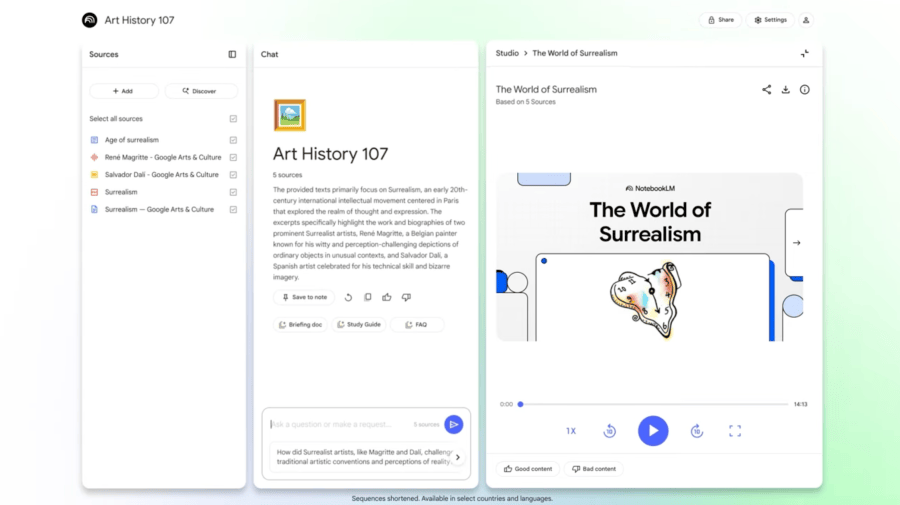
Users can also customize the content and focus of each Video Overview. You can provide specific learning goals, define your background knowledge, or set a target audience to shape how the AI generates the output. That means you can ask it to explain a document to a complete beginner, or to highlight advanced insights relevant to a particular project.
This level of control helps adapt the presentation to different users or contexts without rewriting the source content.
Improved Workflow with the Updated Studio Panel
Alongside Video Overviews, Google has redesigned the Studio panel in NotebookLM. You can now generate and store multiple types of outputs—Audio Overviews, Video Overviews, Mind Maps, and Reports—in a single notebook. This addresses a limitation in earlier versions, where each notebook was restricted to just one output per type.
The new interface also supports multitasking within the Studio panel. You can, for example, play an Audio Overview while navigating a Mind Map or checking a related Report. This update supports a more flexible and interactive workflow, especially when you’re reviewing multiple resources at once.
NotebookLM is currently limited to users aged 18 and over, and is available in English for now. Google has indicated that support for additional languages will be added in future updates. The wider Studio update will roll out to all users over the next few weeks.


Leave a Reply